An important feature of the Bundle-Maker is the 'Key Passage Index'.
This feature allows you to highlight what you consider are the key passages in your bundle to create a schedule of essential reading. These key passages will then be appended to a specially created appendix at the end of your bundle* - it allows the reader to very quickly view and find the most important points in your bundle.
* From Bundle-Maker version 5.8.0 (June 2018) you can also select to have the key passage index at the start of your bundle. Click 'Options' in the top right corner of the Bundle-Maker dialog and tick the option to 'Place the key passage index as the first item of the bundle instead of the last item'.
You highlight key passages whilst at the stage of building your bundle in Microsoft Word and before you run the Bundle-Maker.
When working on your bundle in Microsoft Word, simply work through your bundle and find and select the paragraphs you wish to include in your key passage index. When you have selected the text, use the 'Bundle-Maker' ribbon/menu and from this select 'Highlight Key Passage' (text will be highlighted in yellow) or you can simply use the standard Microsoft Word highlight function (which will also let you select which colour to use when highlighting).
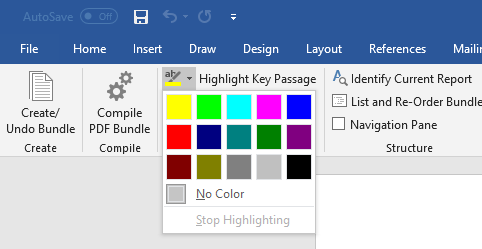
Step 1: Select the text you want to appear your key passage and highlight it.
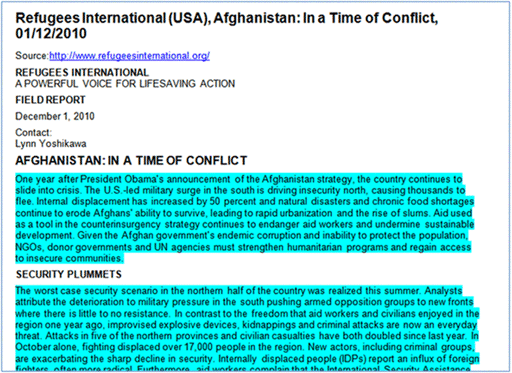
Simply repeat the process for all other passages in your bundle. There should be no practical limit on the number of items that can be highlighted.
When working through your bundle, you can use the 'Identify Current Report' command from the Bundle-Maker ribbon/menu to check which report you are viewing before highlighting a key passage. Just click your cursor in the report text and then click 'Identify Current Report' to bring up a message box identifying the current report:
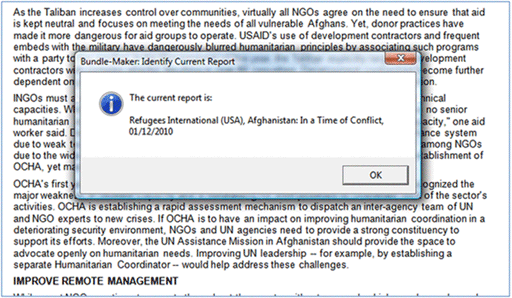
When all key passages have been highlighted, run the Bundle-Maker. An index of key passages will be created at the end of your document:
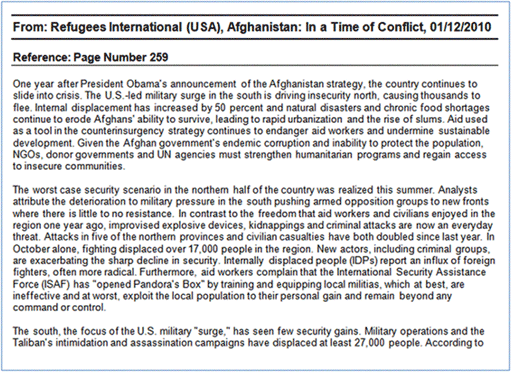
The index will show which document the key passage is from and it will show on which page the passage appears in your bundle.
If you tick the 'Outline number the Key Passage Index' option (for this option, click 'Options' in the top right corner of the Bundle-Maker dialog) then you can select to have all key passages individually numbered for easy reference:
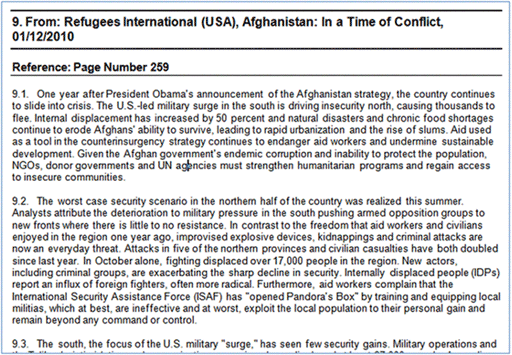
This allows you to very easily refer a reader to a certain paragraph within your index (very useful if your key passage index contains many paragraphs). Each document in your key passage index is numbered from 1, 2, 3, etc., and each passage within each document is sub numbered 1.1, 1.2, 1.3, etc.
If you use the undo command to undo bundle formatting, note that you can select to remove all highlighting as an option.