Note: Version 5.11.0 (May 2022) of the Bundle-Maker now also allows you to insert the contents of a PDF file directly into Word (using Microsoft's PDF convertor). This way works the same as the Bundle-Maker's Word document insert feature. It works OK for simple PDFs that are mainly text, and it will enable PDF text to be added to your key passage index. As Microsoft notes here, more complex PDFs can have a variety of problems. The results may prove unacceptable. Inserting the PDF as a reference and compiling your bundle as PDF bundle gives perfect results for any PDF file and the rest of this guide covers this method.
The Bundle-Maker allows you to add PDF documents to your bundle. Note that if you wish to add PDF files to a bundle, your final bundle will be in PDF format rather than a Word document (whilst it is easy to get a perfect PDF file from the contents of a Word document, getting a PDF file's contents to a Word document can be extremely difficult). You can also use the PDF functionality of the Bundle-Maker to convert your bundle to PDF format, even if you don't need to include any additional PDF files.
This guide covers:
Adding PDF files to your bundle and compiling a PDF format bundle
Converting your bundle to PDF if you don't need to add any additional PDF files
Adding PDF files to your bundle and compiling a PDF format bundle
When adding PDF files to a bundle, there are two steps to go though:
Step 1: Insert a reference to a PDF file
Step 2: Compile your bundle using the PDF Bundle-Compiler
Step 1: Insert a reference to a PDF file
You use the Bundle-Maker to insert a reference to a PDF file within your Word document bundle. You can add multiple PDF files to a bundle and you can add then anywhere within your bundle, just as you would if you were adding Word documents.
To add a reference to a PDF file, click your cursor in the place in the bundle where you wish to insert the PDF file (see the guide here if you need help with how to insert content). Then click 'Insert PDF File' from the Bundle-Maker ribbon tab to open the insert dialog.
On the dialog, click 'Browse...' and select the PDF file to insert. By default, the name of the file will be used as the title, but you can also type a title yourself (or edit the title as required). Note that the title you give the file will be what appears in the table of contents of your finished bundle.
The Bundle-Maker also needs to know the number of pages in the PDF file. This will be determined automatically when you 'Browse...' so there is no need to enter anything here. If needed, however, you can manually edit the number of pages.
Click the 'Insert File' button when done.
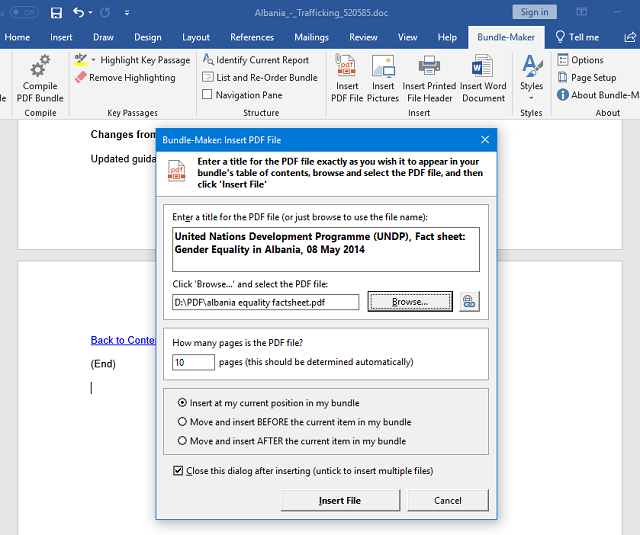
A reference to the PDF file will be inserted.

As the text inserted says, do not move the PDF file - it will later be incorporated into your bundle by the PDF Bundle-Complier and the location of the file needs to match the text inserted. The text in red within the # tags (with the file location and page count) will be hidden when you compile your bundle so don't worry about this appearing in your finished bundle.
You can repeat the process to add any further PDF files.
Continue to build the rest of your bundle. When your bundle is ready to create, you simply create your bundle using the Bundle-Maker as normal (see the guide here if you need details of how to do this). The Bundle-Maker will create your bundle and the final message it displays will let you know that your bundle contains PDF files so you will need to run the PDF Bundle-Complier.
In your Word bundle, you will see the PDF file(s) appear in the table of contents with the correct pagination gap:

The next step is to run the PDF Bundle-Compiler.
Step 2: Compile your bundle using the PDF Bundle-Compiler
The PDF Bundle-Complier is a separate software application that will convert your Word bundle to PDF format, find the PDF files ‘hidden’ as references within your Word document bundle, insert them in the correct place within your bundle, paginate the inserted PDF files, and produce a single, fully paginated PDF format bundle.
To run the PDF Bundle-Complier, click 'Compile PDF Bundle' on the Bundle-Maker ribbon:

When launched, the PDF Bundle-Compiler will automatically detect the current active document in Word and will assume that this is the document you wish to compile. If for some reason the active document isn’t the document you wish to compile, you can click ‘Browse for Word Bundle...’ and select the correct document. But for the vast majority of cases, all you need to do is click the ‘Compile PDF Bundle’ button.
The 'PDF Options' tab allows you to set pagination options (such as font and position - see here for more information), but if you don't need to change any settings, simply click the 'Compile PDF Bundle' button.
Depending on the size of your bundle and the speed of your PC, it may take a few seconds or a few minutes to compile. The process involves automatically saving your bundle as a PDF file, reading the contents of your bundle and inserting the PDF file(s) into your bundle. The PDF Bundle-Compiler will then output a single, fully paginated PDF format bundle.
When the PDF Bundle-Complier has finished, a 'Save As' dialog will appear and you will be prompted to save your complied PDF bundle. Save it in your desired location.
The compiled PDF bundle will then open automatically in your default PDF application (such as Adobe Reader).
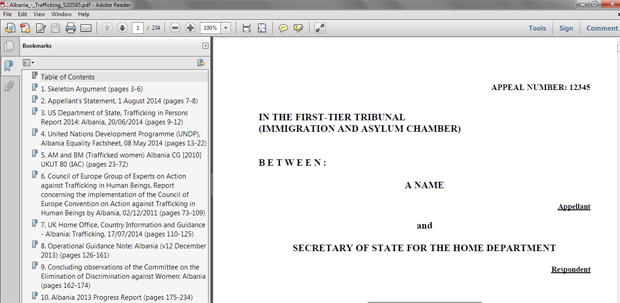
Your bundle is now a single, fully paginated PDF file: all the PDF files that were added as only references as the bundle was built in Microsoft Word are now in place in your compiled PDF bundle.
Note that each item in your bundle is bookmarked for easy navigation (as shown in the screenshot above). The left-hand bookmarks panel in, for example, Adobe Acrobat or Adobe Reader acts like a table of contents. You simply click on a bookmark to jump straight to the item within your bundle. The actual table of contents in your bundle is also hyperlinked.
If you need more detailed instructions, see the guide attached at the end of this page. This is an older document (featuring Word 2007 screenshots), but it's still relevant if you want further explanation.
Additional information on PDF options
The PDF Bundle-Compiler's 'PDF Options' tab allows you to control some PDF options. Most should be self-explanatory (and you probably won't need to change most of them from their default value), but the page number 'Position' option requires some additional explanation.
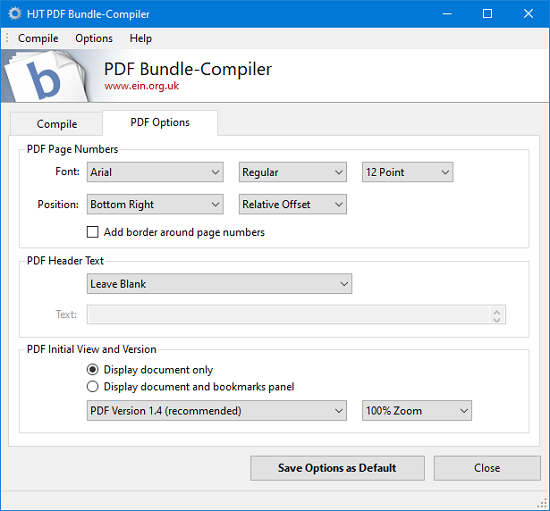
The exact location where the PDF Bundle-Compiler adds page numbers to an inserted PDF file is determined by measuring the PDF page size. The default ‘Relative Offset’ position should be fine for most PDF files and will put the page numbers in a location near the edge of the page, similar to those in your Word bundle. If needed, you can change this option to ‘Absolute Points’ and then specify an absolute position via the points box that appears. Points can be set as low as ‘0’, which is the very edge of the page, or as high as ‘100’. The default point value is 18 - this value is quite near the page edge, ensuring that page numbers are unlikely to appear over content.
Converting your bundle to PDF if you don't need to add any additional PDF files
You can use the PDF Bundle-Complier to convert you bundle to PDF format even if you haven't added any additional PDF files.
Compared to merely saving your bundle as PDF directly in Word, the PDF Bundle-Complier has the advantage of adding detailed bookmarks that provide the title of each item and the page range of each item (which may be required by some court guidance for bundles).
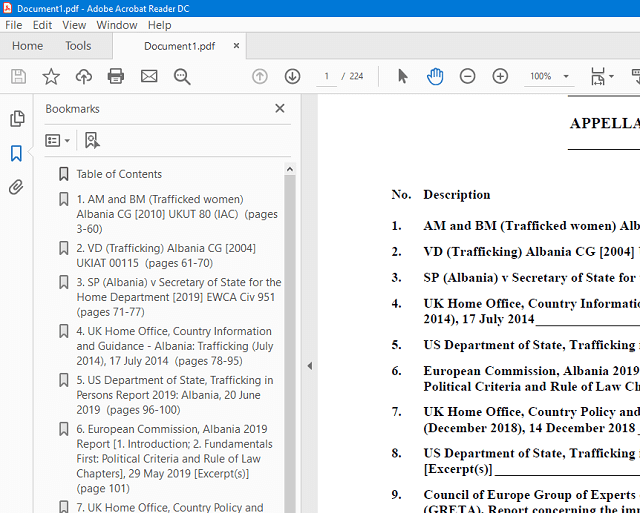
As you can see in the screenshot above, the bookmarks match the title and numbering used for each item in the bundle's table of contents and also include the page range of each item (at the end in brackets).
To convert your bundle to PDF format, simply run the PDF Bundle-Compiler on your finished bundle in Word, as described above. Click 'Compile PDF Bundle' on the Bundle-Maker ribbon and then click the 'Compile PDF Bundle' button when the PDF Bundle-Compiler opens. Save your PDF bundle when prompted.
-
Attachment Size HJT PDF Bundle-Compiler Help Guide.pdf (475.85 KB) 475.85 KB